Amazon - Photo Display FTUE
How might we optimize the out-of-box experience with trust?

November 2025
In fall of 2025, Amazon launched the newest Echo Show 8 and 11, projected to reach 2.5M new customers. For Amazon Photos, this was our chance to revamp our setup experience.
I set the strategic direction, owned designs from lo-fi to QA, shaped content design, and drove alignement across 7+ teams.
September 2024 - Current
I’m currently a UX Designer at Amazon Photos, where I lead the end-to-end experience of personalizing smart home devices with photos. The customer journey starts on mobile where they select the photos to display, and extending to the out-of-box, management, and ambient display experiences on Echo Show and Fire TV.
Impact
Achieve parity across mobile and Echo Show setup experiences
Achieve parity across mobile and Echo Show setup experiences
Introduce refined, strategic logic for onboarding flow sequencing to account for contextual flows based on different account sizes
Introduce refined, strategic logic for onboarding flow sequencing to account for contextual flows based on different account sizes
Drove 15.7% increase in YoY personalization rates
CASE STUDY
CASE STUDY
Photos in Alexa FTUE
Photos in Alexa FTUE
How might we optimize the out-of-box experience with trust?
November 2025
THE CONTEXT
THE CONTEXT
Role: Lead UX Designer
Stakeholders: Photos Org Product & Engineering, Alexa Org Product & Engineering, Alexa Design System Team, Devices Org Legal and Marketing
Timeline: 1 month for concept to handoff
Role: Lead UX Designer
Stakeholders: Photos Org Product & Engineering, Alexa Org Product & Engineering, Alexa Design System Team, Devices Org Legal and Marketing
Timeline: 1 month for concept to handoff
THE PROBLEM
THE PROBLEM
Storage-product framing in a device setup moment
During the out-of-box-experience, new Echo Show customers are able to setup their Photo Display – set of photos rotating as the device background. Existing Amazon Photos users can directly select collections they've already created in the app to display, while new-to-Amazon-Photos will be presented with a QR code to download the mobile app to continue.
In this hand-off process, the current experience loses the user's context and therefore presents the following user problems:
During the out-of-box-experience, new Echo Show customers are able to setup their Photo Display – set of photos rotating as the device background. Existing Amazon Photos users can directly select collections they've already created in the app to display, while new-to-Amazon-Photos will be presented with a QR code to download the mobile app to continue.
In this hand-off process, the current experience loses the user's context and therefore presents the following user problems:

Ask before explaining: users were not given clear instruction on what kind of photos to choose to display, or what they were even for
Ask before explaining: users were not given clear instruction on what kind of photos to choose to display, or what they were even for
Led with storage: auto-save, and people tagging permissions are presented in a storage-oriented light, which doesn't resonate with device customers
Led with storage: auto-save, and people tagging permissions are presented in a storage-oriented light, which doesn't resonate with device customers
Disjointed user experiences: having to jump between the device and the mobile phone
Disjointed user experiences: having to jump between the device and the mobile phone
THE APPROACH
THE APPROACH
How might we provide enough context for users to make fast, informed decisions?
In order to help make users make informed decisions, it was important to understand what they find valuable. After compiling past user research, the top user need is to balance control and ease.
In order to help make users make informed decisions, it was important to understand what they find valuable. After compiling past user research, the top user need is to balance control and ease.
— I honestly just want to be able to select the photos myself, that seems the most simple
— I honestly just want to be able to select the photos myself, that seems the most simple
— I really just want to get my device up and working
— I really just want to get my device up and working
These help identify the key areas of opportunity:
Strategic flow logic
Ease of choice
Storytelling of the features
These help identify the key areas of opportunity:
Ease of choice
Storytelling of the features
Strategic flow logic
OPPORTUNITY 1
Ease of choice
The first step is to convince users to set this feature up at all. Considering they are part of a 20+ step set-up experience, how do we hook them into decide if they want to display their own photos, or stock imagery?
The first step is to convince users to set this feature up at all. Considering they are part of a 20+ step set-up experience, how do we hook them into decide if they want to display their own photos, or stock imagery?

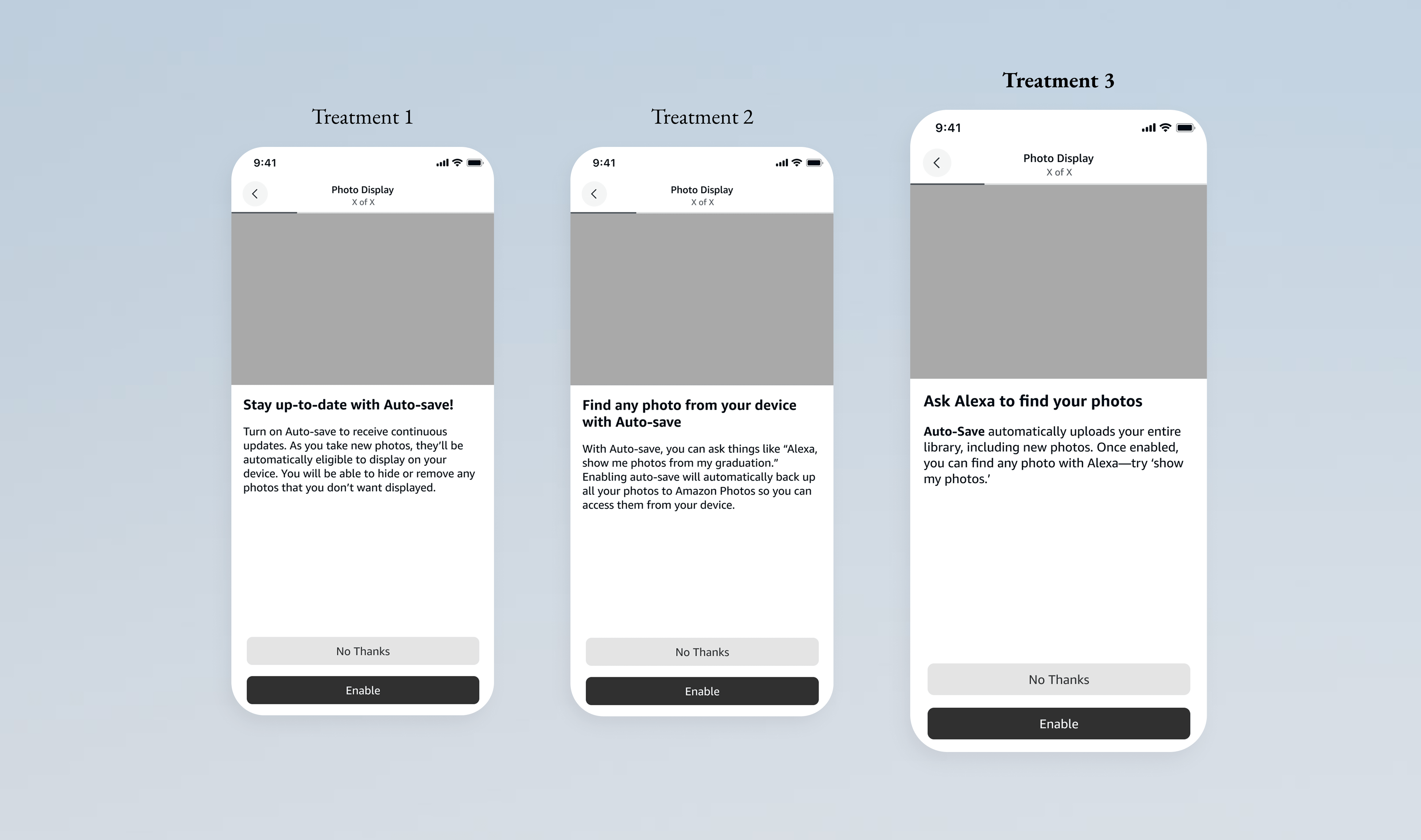
Through the design iterations, we landed on the "Photos Primer" approach – treatment 3. The thinking was that (1) a bifurcated choice of photos vs stock imagery is more cognitive load and (2) the user doesn't have enough idea of the value of either to make an informed decision. Given that stock photos are a safe fallback and we weren't using user trust, I proposed we use the entire real estate to explain the value of personalizing a device with photos instead.
Through the design iterations, we landed on the "Photos Primer" approach – treatment 3. The thinking was that (1) a bifurcated choice of photos vs stock imagery is more cognitive load and (2) the user doesn't have enough idea of the value of either to make an informed decision. Given that stock photos are a safe fallback and we weren't using user trust, I proposed we use the entire real estate to explain the value of personalizing a device with photos instead.
OPPORTUNITY 2
Storytelling of the features
Now that we have the users hooked, how do we continue to present that is empathetic and contextual to the device that they are using it on? Historically features like auto-save or people tagging are native to the photo's storage app. Through iterations on the content design, I landed an an approach that frames these features as ways to unlock more search capabilities with Alexa.
Now that we have the users hooked, how do we continue to present that is empathetic and contextual to the device that they are using it on? Historically features like auto-save or people tagging are native to the photo's storage app. Through iterations on the content design, I landed an an approach that frames these features as ways to unlock more search capabilities with Alexa.
OPPORTUNITY 3
Strategic Flow Logic
Now, while we may have the user hooked, it's important to empathize with the fact that they are most eager just to get their device setup and see it finally come to life. How do put the user first and respect that sense of urgency?
Now, while we may have the user hooked, it's important to empathize with the fact that they are most eager just to get their device setup and see it finally come to life. How do put the user first and respect that sense of urgency?

The answer was introducing logic into the flow to only show certain screens unders set conditions. I worked with Product to make informed decisions based on qualitative and quantative data. We aligned on the following optimizations:
"Daily Memories" for users with 200+ photos: Daily Memories is our hero features which automatically curates photos on behalf of the user everyday. For existing users, lead with the easier option. For new/light users, lead with the more manual approach to earn their trust first.
Auto-save as a pre-requisite for People Tagging: People Tagging (face clustering) is a feature that's only really valuable if the user enables automatic backup. So, if a user skips the auto-save step, we let them bypass the People Tagging step all together.
The answer was introducing logic into the flow to only show certain screens unders set conditions. I worked with Product to make informed decisions based on qualitative and quantative data. We aligned on the following optimizations:
"Daily Memories" for users with 200+ photos: Daily Memories is our hero features which automatically curates photos on behalf of the user everyday. For existing users, lead with the easier option. For new/light users, lead with the more manual approach to earn their trust first.
Auto-save as a pre-requisite for People Tagging: People Tagging (face clustering) is a feature that's only really valuable if the user enables automatic backup. So, if a user skips the auto-save step, we let them bypass the People Tagging step all together.
DESIGN DETAIL
Using and influencing a design system
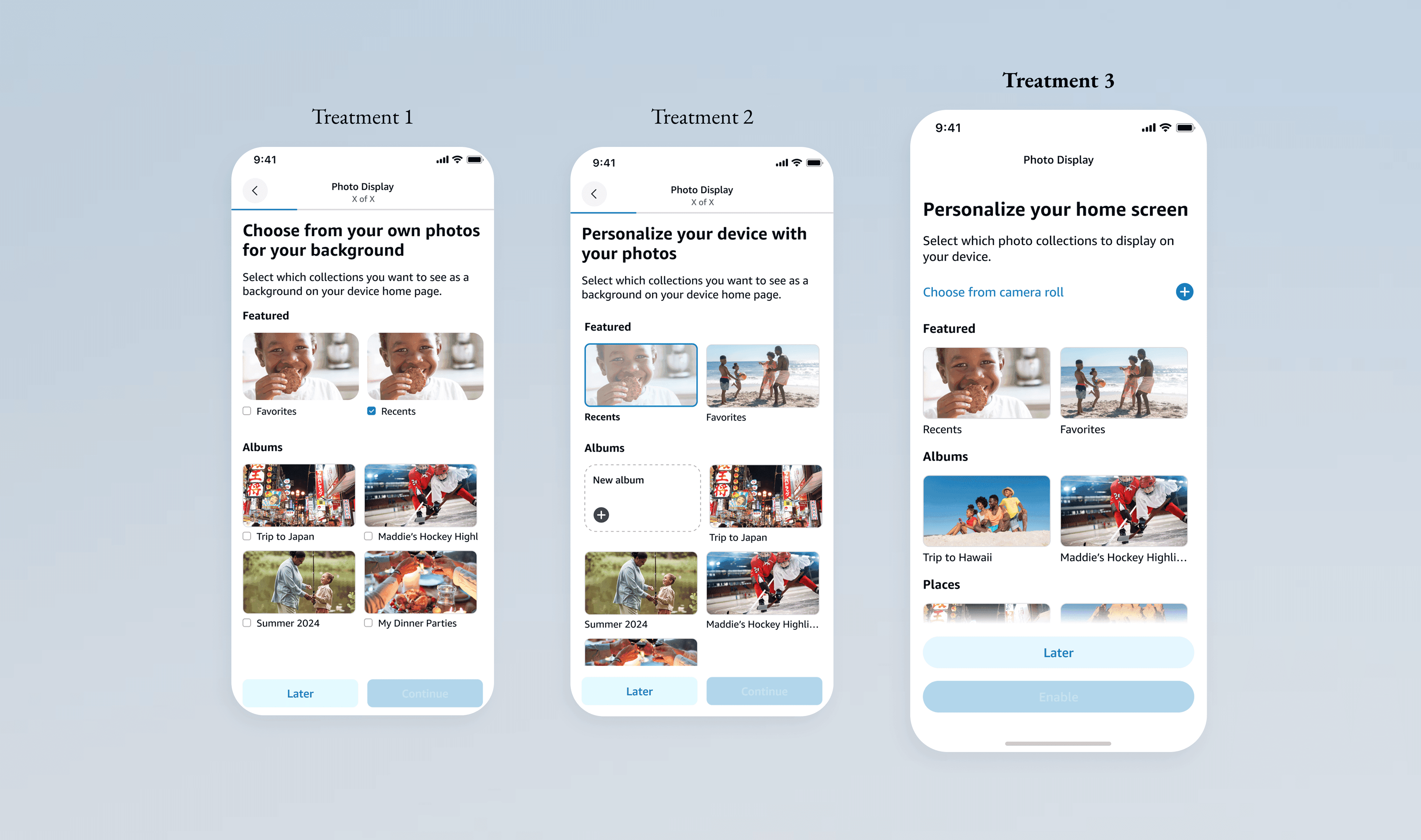
The Alexa Mobile design system is already robust. In the interest of consistency for users, and scalability for engineering, I stress-tested existing components and proposed unique combinations to work for the Photos team use case. Below is an example of how I landed on the photo selection indicator:
The Alexa Mobile design system is already robust. In the interest of consistency for users, and scalability for engineering, I stress-tested existing components and proposed unique combinations to work for the Photos team use case. Below is an example of how I landed on the photo selection indicator:
XFN ALIGNMENT
Collaborating across 7+ teams
Once the flows were finalized, I brought them to a total of 4-cross functional reviews with various leadership teams, preparing unique presentations to provide the right guidance and conversation rails for each audience to secure the alignment needed for sign-off. I also participated in design QA across the Alexa and Photos engineering teams.
Once the flows were finalized, I brought them to a total of 4-cross functional reviews with various leadership teams, preparing unique presentations to provide the right guidance and conversation rails for each audience to secure the alignment needed for sign-off. I also participated in design QA across the Alexa and Photos engineering teams.

THE RESULTS
THE RESULTS
Photos in Alexa FTUE
Photos in Alexa FTUE
How might we optimize the out-of-box experience with trust?
November 2025

The same changes in the flows were applied to the e
10.2% acquisition via Alexa App
15.7% in YoY personalization rates
4.9% increase in onboarding health
In order to help make users make informed decisions, it was important to understand what they find valuable. After compiling past user research, the top user need is to balance control and ease.
What were the results? Through simplifying choices for users, emphasizing value propositions, and creating contextual flows, we saw a:
10.2% acquisition via Alexa App
15.7% in YoY personalization rates
4.9% increase in onboarding health
In order to help make users make informed decisions, it was important to understand what they find valuable. After compiling past user research, the top user need is to balance control and ease.
UP NEXT
Yours Truly
Yours Truly
